
ANM Frame Counter
ANM Frame Counter is a practical Moho script that helps animators quickly calculate frame ranges, total frame counts, and duration while they work. Enter the first and last frame values for multiple shots or scenes, adjust the FPS when needed, and instantly see the updated results in a clean floating panel, making timing checks, scene planning, and production calculations faster and easier.
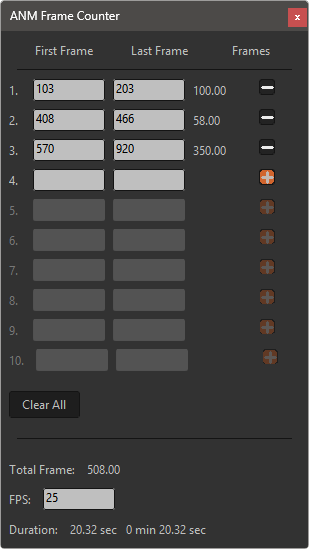
ANM Frame Counter is a lightweight Moho tool by Animative that quickly calculates the number of frames between multiple frame ranges. Enter the first and last frame values, and the result updates instantly for each row, along with the total frame count and duration in seconds. The FPS value can be adjusted at any time, automatically recalculating the final duration, while dynamic add/remove buttons make it easy to manage multiple ranges in a clean, always-accessible floating panel.
Features:
Two frame fields per row.
Instant frame count per completed range.
Total Frame, editable FPS and duration in seconds.
Row icon is + while the row is empty.
Row icon changes to - as soon as either field contains a value.
Entering a value in the last active row automatically reveals a fresh empty row.
Clicking - deletes that row and moves following rows upward.
Clicking + on an empty row reveals one more empty row.
A wide Clear All button clears all rows.
No LM_Table/TextList/ListBox widgets are used, avoiding a native macOS ARM crash.
Installation
Use Moho > Scripts > Install Script, or copy the tool and ScriptResources folders
into the matching folders in your Moho Custom Content Folder. Reload scripts or
restart Moho after replacing an older version.
Made by: Animative
Features:
Two frame fields per row.
Instant frame count per completed range.
Total Frame, editable FPS and duration in seconds.
Row icon is + while the row is empty.
Row icon changes to - as soon as either field contains a value.
Entering a value in the last active row automatically reveals a fresh empty row.
Clicking - deletes that row and moves following rows upward.
Clicking + on an empty row reveals one more empty row.
A wide Clear All button clears all rows.
No LM_Table/TextList/ListBox widgets are used, avoiding a native macOS ARM crash.
Installation
Use Moho > Scripts > Install Script, or copy the tool and ScriptResources folders
into the matching folders in your Moho Custom Content Folder. Reload scripts or
restart Moho after replacing an older version.
Made by: Animative
The script is supplied with the following files:
Icons and cursors:


Resource files:
Subfolder: anm_frame_counter


